

Moxa NPort 6450 | Secure Serial Device Server, 4-Port RS-232/422/485
Moxa NPort 6450 | Secure Serial Device Server, 4-Port RS-232/422/485
Authorised Moxa Partner
SKU:NPort 6450
Stock Status: Enquire
Description
Description
The Moxa NPort 6450 is a 4-port RS-232/422/485 secure serial device server that connects legacy serial equipment to an Ethernet network. Four DB9 male serial ports and a 10/100BaseT(X) RJ45 port make it suited to industrial automation, building management and remote device access. Secure operation modes including Reverse SSH, Secure Real COM, Secure TCP Client and Secure TCP Server protect serial data in transit. This standard temperature model runs from a 12 to 48 VDC input and operates from 0 to 55°C.
A front LCD panel with push buttons allows local configuration, and a Windows utility, Device Search Utility, web console and Telnet/SSH console are available for remote setup. Real COM and TTY drivers support Windows, Linux and macOS hosts, and NM Series expansion modules add optional RJ45 or fibre Ethernet ports. The metal housing supports desktop, wall and DIN-rail mounting with the optional kit.
Features
Features
Warranty
Warranty
All technical data should be verified on the manufacturer data sheets.
View full details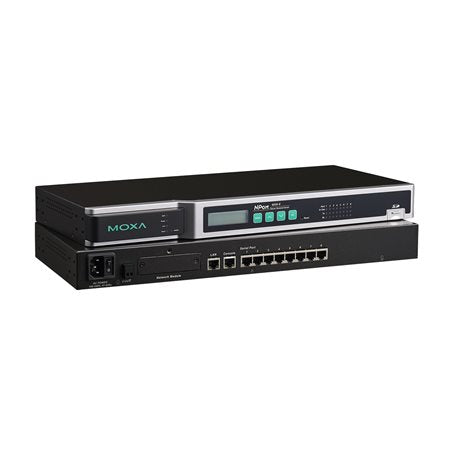
What's the difference between add to cart, backorder & request a quote?
Add to Cart lets you purchase in-stock products immediately.
Backorder is available for items that are out of stock. Placing a backorder secures your order; contact us to confirm ETA before ordering if you need it urgently.
Request a Quote is for customised pricing, volume-based deals, or orders that need a tailored response.
specs-tabs
Collapsible content
Technical Specifications
FAQs
Datasheet
Technical Specifications
FAQs
Datasheet
This product has a detailed PDF datasheet available. Open PDF datasheet in a new tab .
Related Products
-
 Vendor:Teltonika
Teltonika NTP001000000 | NTP001 Stratum-1 GNSS NTP Time Server, DIN Rail
NTP001000000
In stock
Vendor:TeltonikaThe Teltonika NTP001 is a Stratum-1 GNSS NTP time server that delivers accurate, UTC-traceable time ... -
 Vendor:Moxa
Moxa UPort-1150I | UPort 1150I USB-to-Serial Converter, RS-232/422/485, 2kV
UPort 1150I
Stock Status: Enquire
Vendor:MoxaThe Moxa UPort 1150I is a 1-port RS-232/422/485 USB-to-serial converter with 2 kV isolation protecti... -
 Vendor:Moxa
Moxa UPort-1110 | UPort 1110 USB-to-Serial Converter, 1-Port RS-232, DB9
UPort 1110
Stock Status: Enquire
Vendor:MoxaThe UPort 1110 is a compact USB-to-serial converter that adds one RS-232 DB9 male serial port to a l... -
 Vendor:Moxa
Moxa UPort 1450-G2-T | UPort 1400-G2 4-Port RS-232/422/485 USB Converter, -40 to 75°C
UPort 1450-G2-T
Stock Status: Enquire
Vendor:MoxaThe Moxa UPort 1450-G2-T is an industrial 4-port RS-232/422/485 USB-to-serial converter with a USB 3... -
 Vendor:Moxa
Moxa NPort 5610-16 | 16-Port RS-232 Rackmount Device Server, RJ45
NPort 5610-16
Stock Status: Enquire
Vendor:MoxaThe NPort 5610-16 is a 16-port RS-232 rackmount serial device server that makes serial devices netwo... -
 Vendor:Moxa
Moxa NPort S9650I-16-2HV-MSC-T | NPort S9650I 16-Port RS-232/422/485 Serial Server, 2x MM SC Fibre, HV
NPort S9650I-16-2HV-MSC-T
Stock Status: Enquire
Vendor:MoxaThe NPort S9650I-16-2HV-MSC-T is a rugged 16-port RS-232/422/485 serial device server with a built-i... -
 Vendor:Moxa
Moxa NPort 6650-16-T | NPort 6650 16-Port RS-232/422/485 Terminal Server, 100-240 VAC, -40 to 75C
NPort 6650-16-T
Stock Status: Enquire
Vendor:MoxaThe Moxa NPort 6650-16-T is a 16-port RS-232/422/485 secure terminal server that connects serial dev... -
 Vendor:Moxa
Moxa OPT 8S | 8-Port RS-232 Serial Connection Box, DB62, DB25F
OPT 8S
Stock Status: Enquire
Vendor:MoxaThe Moxa OPT 8S is an 8-port RS-232 serial connection box that fans out a serial board's DB62 connec...


Recently Viewed
-

Request for a Quote
Looking for competitive pricing? Submit a request, and our team will provide a tailored quote that fits your needs.

