

ATEN US3312-AT | US3312 2-Port USB-C KVM Switch, DisplayPort 4K60, Remote Selector
ATEN US3312-AT | US3312 2-Port USB-C KVM Switch, DisplayPort 4K60, Remote Selector
Authorised ATEN Partner
SKU:US3312-AT
Stock Status: Enquire
Description
Description
The ATEN US3312 is a 2-port USB-C to DisplayPort cable KVM switch that lets one DisplayPort monitor and a USB keyboard and mouse control two USB-C computers or devices. It supports True 4K video up to 4096 x 2160 at 60 Hz (4:4:4) and includes a remote port selector on a 1.8 m cable for instant computer selection from the desk.
The switch is bus-powered with no external power adapter, and the two USB 2.0 Type-A console ports allow keyboard, mouse and other USB peripheral sharing. It switches in about 3 seconds across Windows, macOS, Android and iPadOS devices that support DisplayPort Alt Mode over USB-C, and its compact housing with a hook design suits under-desk or space-saving mounting.
Features
Features
Warranty
Warranty
All technical data should be verified on the manufacturer data sheets.
View full details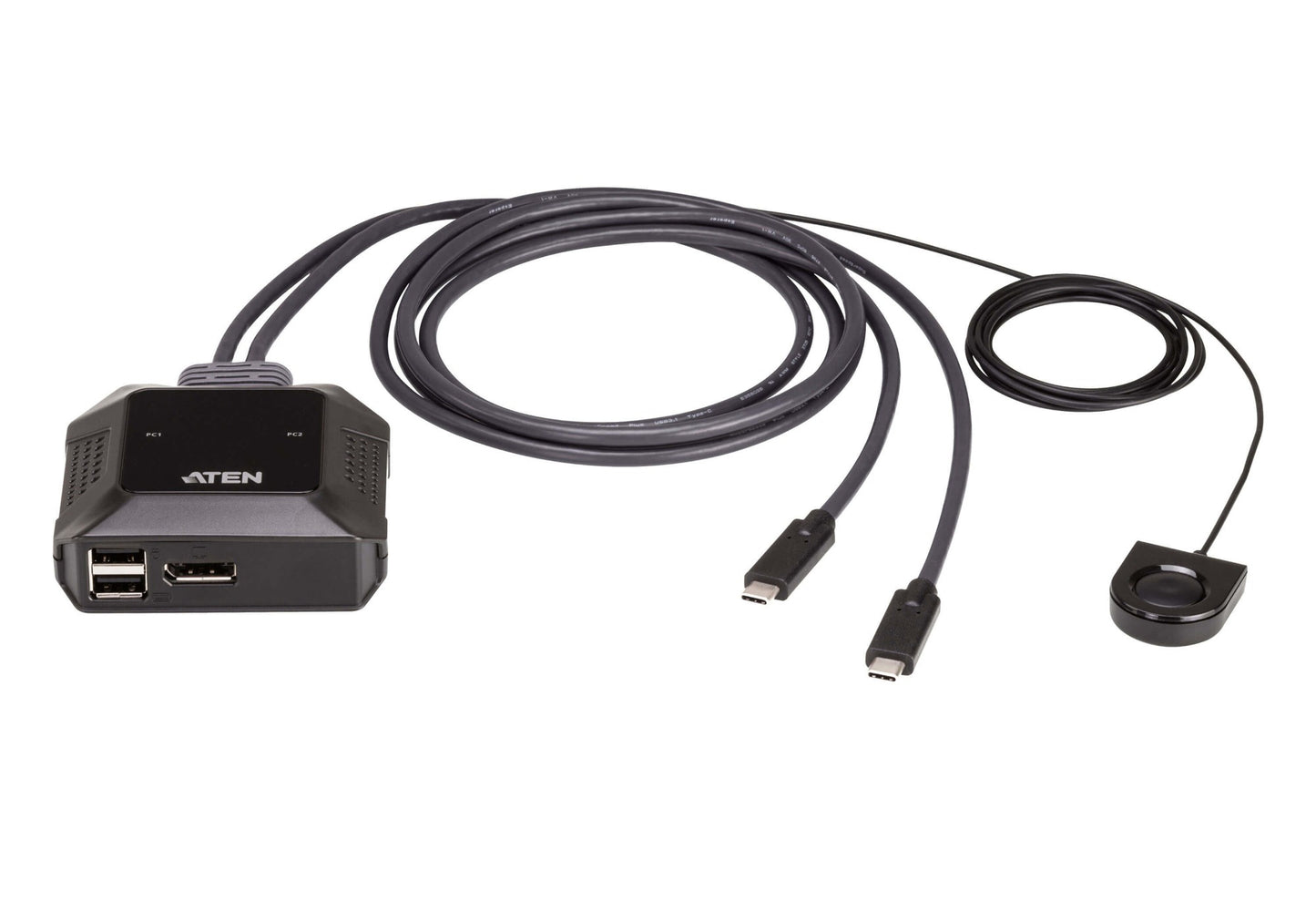
What's the difference between add to cart, backorder & request a quote?
Add to Cart lets you purchase in-stock products immediately.
Backorder is available for items that are out of stock. Placing a backorder secures your order; contact us to confirm ETA before ordering if you need it urgently.
Request a Quote is for customised pricing, volume-based deals, or orders that need a tailored response.
specs-tabs
Collapsible content
Technical Specifications
FAQs
Datasheet
Manual
Technical Specifications
FAQs
Datasheet
This product has a detailed PDF datasheet available. Open PDF datasheet in a new tab .
Manual
This product has a detailed PDF manual available. Open PDF manual in a new tab .
Related Products
-
 Vendor:ATEN
ATEN CS1794-AT-U | CubiQ 4-Port HDMI KVMP Switch, USB 2.0, Audio, Cables
CS1794-AT-U
Stock Status: Enquire
Vendor:ATENThe ATEN CS1794-AT-U is a 4-port HDMI KVMP switch that lets one USB keyboard, mouse and HDMI monitor... -
 Vendor:ATEN
ATEN CS1184DPH4C-AT-U | 4-Port Secure KVM Switch, DisplayPort/HDMI, 5K, CAC
CS1184DPH4C-AT-U
Stock Status: Enquire
Vendor:ATENThe ATEN CS1184DPH4C-AT-U is a 4-port universal secure KVM switch for a single display, accepting Di... -
 Vendor:ATEN
ATEN US421A-AT | US421A 4-Port USB 2.0 Peripheral Switch, 4 x PC, 1 x USB
US421A-AT
Stock Status: Enquire
Vendor:ATENThe ATEN US421A is a 4-port USB 2.0 peripheral switch that lets up to four computers share a single ... -
 Vendor:ATEN
ATEN US3310-AT | 2-Port USB-C KVM Dock Switch, 4K HDMI@30Hz, USB 3.2, 85W PD
US3310-AT
In stock
Vendor:ATENThe ATEN US3310 is a 2-Port USB-C KVM dock switch that lets a USB-C laptop and an Android smartphone... -
 Vendor:ATEN
ATEN UCE32100-AT-U | 4-Port USB 2.0 Extender over Cat 5e/6, up to 100 m
UCE32100-AT-U
In stock
Vendor:ATENThe ATEN UCE32100-AT-U is a 4-port USB 2.0 extender that carries USB signals over Cat 5e/6 Ethernet ... -
 Vendor:ATEN
ATEN US3311-AT-U | Duo Flex 2-Port 4K DP USB-C KVM Dock, PD 85W
US3311-AT-U
Stock Status: Enquire
Vendor:ATENThe ATEN US3311-AT-U is a 2-port 4K DisplayPort USB-C KVM dock switch from the Duo Flex range, letti... -
 Vendor:ATEN
ATEN US234-AT | US234 2-Port USB 3.0 Peripheral Switch, 4x USB-A, Remote
US234-AT
Stock Status: Enquire
Vendor:ATENThe ATEN US234 is a 2-port USB 3.0 peripheral switch that lets two computers share four USB-A device... -
 Vendor:ATEN
ATEN KE6940AiT-AX-U | KE6940AiT KVM over IP Transmitter, Dual DVI-I, USB HID
KE6940AiT-AX-U
Stock Status: Enquire
Vendor:ATENThe ATEN KE6940AiT-AX-U is a dual DVI-I KVM over IP transmitter that extends two DVI or VGA video ou...


Recently Viewed
-

Request for a Quote
Looking for competitive pricing? Submit a request, and our team will provide a tailored quote that fits your needs.

