

Moxa MGate EIP3270 | EtherNet/IP to DF1 Gateway, 2-Port
Moxa MGate EIP3270 | EtherNet/IP to DF1 Gateway, 2-Port
Authorised Moxa Partner
SKU:MGate EIP3270
Stock Status: Enquire
Description
Description
The MGate EIP3270 is a 2-port EtherNet/IP to DF1 protocol gateway that lets serial DF1 devices join an EtherNet/IP network. It converts between EtherNet/IP (PCCC) and serial DF1, with two RS-232/RS-422 serial ports and two 10/100 Ethernet ports. This standard temperature model operates from 0 to 60°C and suits control cabinets and plant-floor deployments.
The gateway supports up to 8 client connections in DF1 transparent full duplex mode and runs from a 12 to 48 VDC supply. Configuration is handled over Ethernet with the MGate Manager Windows utility, and the IP30 housing with a plastic top cover and metal base plate suits DIN-rail style industrial installations. It carries ATEX, Class I Division 2 and IECEx hazardous location approvals (IECEx on request) along with industrial EMC and safety certifications.
Features
Features
Warranty
Warranty
All technical data should be verified on the manufacturer data sheets.
View full details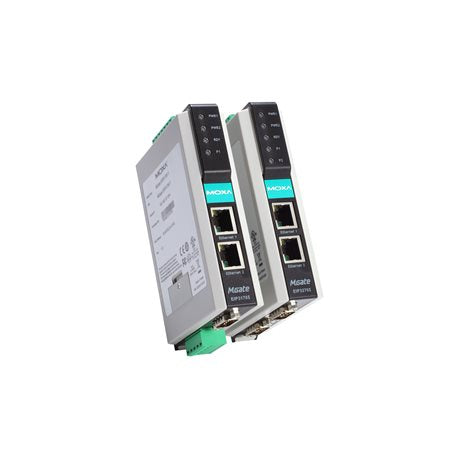
What's the difference between add to cart, backorder & request a quote?
Add to Cart lets you purchase in-stock products immediately.
Backorder is available for items that are out of stock. Placing a backorder secures your order; contact us to confirm ETA before ordering if you need it urgently.
Request a Quote is for customised pricing, volume-based deals, or orders that need a tailored response.
specs-tabs
Collapsible content
Technical Specifications
FAQs
Datasheet
Technical Specifications
FAQs
Datasheet
This product has a detailed PDF datasheet available. Open PDF datasheet in a new tab .
Related Products
-
 Vendor:Moxa
Moxa MGate 5122 | CAN to EtherNet/IP Gateway, -10 to 60C
MGate 5122
Stock Status: Enquire
Vendor:MoxaThe Moxa MGate 5122 is a 1-port CAN to EtherNet/IP protocol gateway that connects CANopen, J1939 and... -
 Vendor:Moxa
Moxa MGate 5122-T/KC | MGate 5122 CAN to EtherNet/IP Gateway, -40 to 75°C, KC
MGate 5122-T/KC
Stock Status: Enquire
Vendor:MoxaThe MGate 5122-T/KC is an industrial CAN to EtherNet/IP protocol gateway that converts CANopen, J193... -
 Vendor:Moxa
Moxa MGate 5123/KC | MGate 5123 CAN to PROFINET IO Gateway, KC, 2x RJ45
MGate 5123/KC
Stock Status: Enquire
Vendor:MoxaThe Moxa MGate 5123/KC is an industrial CANopen, J1939 and proprietary CAN (CAN 2.0A/B) to PROFINET ... -
 Vendor:Moxa
Moxa MGate 5123-T/KC | MGate 5123-T CAN to PROFINET Gateway, -40 to 75°C, KC
MGate 5123-T/KC
Stock Status: Enquire
Vendor:MoxaThe MGate 5123-T/KC is an industrial CAN to PROFINET protocol gateway that converts CANopen, J1939 o... -
 Vendor:APC
APC TSXETG100 | TSX Ethernet Modbus Gateway, RS485, 24 VDC, DIN Rail
TSXETG100
Stock Status: Enquire
Vendor:APCThe TSXETG100 is an Ethernet to Modbus serial gateway and router that connects Modbus RS485 devices,... -
 Vendor:APC
APC TSXETG100POE | Transparent Ready Modbus Ethernet Gateway, PoE Injector
TSXETG100POE
Stock Status: Enquire
Vendor:APCThe APC TSXETG100POE is a Transparent Ready Modbus Ethernet gateway supplied with a PoE injector, de... -
 Vendor:Moxa
Moxa MGate MB3660I-16-2AC | MGate MB3660 16-Port Modbus Gateway, 2 kV Isolation, Dual AC
MGate MB3660I-16-2AC
Stock Status: Enquire
Vendor:MoxaThe MGate MB3660I-16-2AC is a 16-port Modbus gateway that converts between Modbus TCP and Modbus RTU... -
 Vendor:Moxa
Moxa MGate 5121 | CAN to Modbus TCP Gateway, 1-Port, -10 to 60°C
MGate 5121
Stock Status: Enquire
Vendor:MoxaThe MGate 5121 is a 1-port industrial CAN to Modbus TCP gateway that converts CANopen, J1939 and pro...


Recently Viewed
-

Request for a Quote
Looking for competitive pricing? Submit a request, and our team will provide a tailored quote that fits your needs.

