

Moxa ioLogik-E1260 | ioLogik E1200 Remote Ethernet I/O, 6x RTD, 2-Port Switch
Moxa ioLogik-E1260 | ioLogik E1200 Remote Ethernet I/O, 6x RTD, 2-Port Switch
Authorised Moxa Partner
SKU:ioLogik E1260
Stock Status: Enquire
Description
Description
The ioLogik E1260 is a compact Ethernet remote I/O unit with six RTD input channels for industrial temperature sensing. This standard temperature model (-10 to 60°C) accepts 2- or 3-wire PT50, PT100, PT200, PT500 and PT1000 sensors, and a built-in 2-port Ethernet switch lets you daisy-chain units to cut cabling and switch costs.
It supports Modbus TCP Server, EtherNet/IP Adapter, a RESTful API and SNMPv1/v2c, so it integrates with SCADA, PLC and IIoT systems. Configuration is handled through a web console or the ioSearch utility for easy mass deployment, and the unit mounts on DIN rail or a wall with a 12 to 36 VDC power input.
Features
Features
Warranty
Warranty
All technical data should be verified on the manufacturer data sheets.
View full details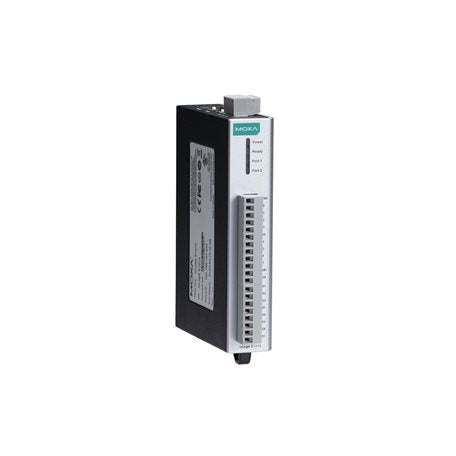
What's the difference between add to cart, backorder & request a quote?
Add to Cart lets you purchase in-stock products immediately.
Backorder is available for items that are out of stock. Placing a backorder secures your order; contact us to confirm ETA before ordering if you need it urgently.
Request a Quote is for customised pricing, volume-based deals, or orders that need a tailored response.
specs-tabs
Collapsible content
Technical Specifications
FAQs
Technical Specifications
FAQs
Related Products
-
 Vendor:ATEN
ATEN VK248-AT | Control System 8-Channel Relay Expansion Box, PoE
VK248-AT
Stock Status: Enquire
Vendor:ATENThe VK248 is an 8-channel relay expansion box that adds eight normally open relay outputs to an ATEN... -
 Vendor:Moxa
Moxa CA-132 | 2-Port RS-422/485 PC/104 Serial Board, No Isolation
CA-132
Stock Status: Enquire
Vendor:MoxaThe Moxa CA-132 is a 2-port RS-422/485 PC/104 serial board that adds industrial serial connectivity ... -
 Vendor:Moxa
Moxa RK-4U-65M | ioPAC 6500 4U Rackmount Kit, 19-Inch Rack Mounting
RK-4U-65M
Stock Status: Enquire
Vendor:MoxaThe RK-4U-65M is a 4U, 19-inch rackmount kit designed for Moxa ioPAC 6500 series modular controllers... -
 Vendor:Moxa
Moxa ioThinx 4533-LX-T (V1) | ioThinx 4533 Modular Controller, Linux, Dual-Core 1 GHz, -40 to 75°C
ioThinx 4533-LX-T (V1)
Stock Status: Enquire
Vendor:MoxaThe Moxa ioThinx 4533-LX-T (V1) is a modular controller from the ioThinx 4530 Series, built around a... -
 Vendor:Moxa
Moxa DE-2-IRIGB-4-DI/DO | DA-720 IRIG-B Time Sync Expansion Module, 2 Ports, 4x DI/DO
DE-2-IRIGB-4-DI/DO
Stock Status: Enquire
Vendor:MoxaThe Moxa DE-2-IRIGB-4-DI/DO is an IRIG-B time synchronisation expansion module with 2 IRIG-B ports a... -
 Vendor:Moxa
Moxa CP-102N-T/KC | CP-102N Mini PCIe Serial Board, 2-Port RS-232, -40 to 85°C
CP-102N-T/KC
Stock Status: Enquire
Vendor:MoxaThe CP-102N-T/KC is a 2-port RS-232 Mini PCI Express serial board designed for industrial automation... -
 Vendor:Moxa
Moxa CP-102N-I-T/KC | CP-102N Mini PCIe Serial Board, 2-Port RS-232, 2.5 kV Isolation, KC
CP-102N-I-T/KC
Stock Status: Enquire
Vendor:MoxaThe CP-102N-I-T/KC is a 2-port RS-232 Mini PCI Express serial board for industrial automation and in... -
 Vendor:Moxa
Moxa 65M-CPU14-IEC-CT-T | ioPAC 6500 IEC 61131-3 CPU Module, 2x Serial, -40 to 75°C, Coated, 2x GbE
65M-CPU14-IEC-CT-T
Stock Status: Enquire
Vendor:MoxaThe Moxa 65M-CPU14-IEC-CT-T is an ioPAC 6500 IEC 61131-3 CPU module for rugged, modular RTU and cont...


Recently Viewed
-

Request for a Quote
Looking for competitive pricing? Submit a request, and our team will provide a tailored quote that fits your needs.

