

Moxa Mxconfig | Industrial Network Configuration Software
Moxa Mxconfig | Industrial Network Configuration Software
Authorised Moxa Partner
SKU:Mxconfig
Stock Status: Enquire
Description
Description
The Moxa MXconfig industrial network configuration software is a Windows-based utility for installing, configuring and maintaining multiple Moxa managed devices from a single console. It supports mass IP assignment, bulk configuration deployment, firmware upload and configuration backup and duplication, cutting setup time across large industrial Ethernet networks.
MXconfig searches the network by broadcast to discover supported Moxa managed Ethernet devices, including AWK, EDR, NPort, VPort, EDS and ICS series products, depending on firmware version. Link sequence detection, a security wizard and a VLAN Quick-Add Panel help engineers avoid manual configuration errors, and three user privilege levels allow controlled access for different team members.
Features
Features
Warranty
Warranty
All technical data should be verified on the manufacturer data sheets.
View full details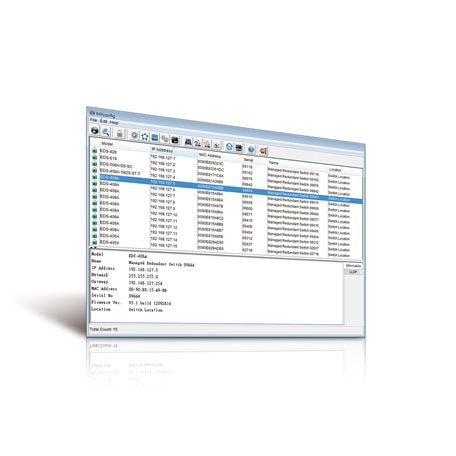
What's the difference between add to cart, backorder & request a quote?
Add to Cart lets you purchase in-stock products immediately.
Backorder is available for items that are out of stock. Placing a backorder secures your order; contact us to confirm ETA before ordering if you need it urgently.
Request a Quote is for customised pricing, volume-based deals, or orders that need a tailored response.
specs-tabs
Collapsible content
Technical Specifications
FAQs
Datasheet
Technical Specifications
FAQs
Datasheet
This product has a detailed PDF datasheet available. Open PDF datasheet in a new tab .
Related Products
-
 Vendor:Fortinet
Fortinet FMN-100F | FortiMonitor 100F OnSight Collector Appliance, 4x GE
FMN-100F
Stock Status: Enquire
Vendor:FortinetThe FortiMonitor 100F is a plug-and-play hardware OnSight Collector appliance that brings network mo... -
 Vendor:Juniper
Juniper NFX150-S-ADV | NFX150 Advanced Software License for NFX150-S1/S1E
NFX150-S-ADV
Stock Status: Enquire
Vendor:JuniperThe NFX150-S-ADV is an Advanced Junos software license for the NFX150-S1 and NFX150-S1E network serv... -
 Vendor:Moxa
Moxa Moxa Industrial Linux | Industrial Linux OS, Debian-Based, 10-Year Long-Term Support
Moxa Industrial Linux
Stock Status: Enquire
Vendor:MoxaMoxa Industrial Linux (MIL) is a Debian-based industrial Linux operating system built for Moxa indus... -
 Vendor:Juniper
Juniper NFX250-S-STD | NFX250 Junos Software Base Licence, S1/S1E/S2
NFX250-S-STD
Stock Status: Enquire
Vendor:JuniperThe Juniper NFX250-S-STD is the standard Junos Software Base licence for the NFX250-S1, NFX250-S1E a... -
 Vendor:Moxa
Moxa MXIO Programming Library | ioLogik I/O Programming Library, Ethernet and RS-485
MXIO Programming Library
Stock Status: Enquire
Vendor:MoxaThe Moxa MXIO Programming Library is a software library for managing I/O devices and transferring da... -
 Vendor:Teltonika
Teltonika RMSDT101G150 | RMS Connect/VPN Data Pack, 150GB, 10 Year Expiry
RMSDT101G150
Stock Status: Enquire
Vendor:TeltonikaThe Teltonika RMSDT101G150 is a 150GB RMS Connect and RMS VPN data pack with a 10 year expiry, deliv... -
 Vendor:Moxa
Moxa LIC-MXsecurity-NEW-XN-SR | MXsecurity Perpetual Node Licence, Custom Qty
LIC-MXsecurity-NEW-XN-SR
Stock Status: Enquire
Vendor:MoxaThe Moxa MXsecurity perpetual node licence enables centralised visibility and security management of... -
 Vendor:Moxa
Moxa MXstudio | Industrial Network Management Software Suite
MXstudio
Stock Status: Enquire
Vendor:MoxaMXstudio is an industrial network management software suite that brings installation, operation, mai...


Recently Viewed
-

Request for a Quote
Looking for competitive pricing? Submit a request, and our team will provide a tailored quote that fits your needs.

