

Yealink A40-010-1 | MeetingBar A40 All-in-One Video Bar, VCR11 Remote
Yealink A40-010-1 | MeetingBar A40 All-in-One Video Bar, VCR11 Remote
Authorised Yealink Partner
SKU:A40-010-1
Stock Status: Enquire
Description
Description
The Yealink MeetingBar A40 is an all-in-one video conferencing bar for small to medium meeting rooms, supplied with the VCR11 remote control for Microsoft Teams room deployments. It combines dual 48MP cameras with up to 4K resolution and 6x digital zoom, an 8-microphone array with 6 m pickup, and built-in 2 x 10W stereo speakers in a single unit.
Running Android 13 on the Microsoft Device Ecosystem Platform, the A40 supports native Microsoft Teams and Zoom, as well as USB/BYOD mode for use with a laptop. AI auto framing, speaker tracking and IntelliFocus multi-focus framing keep participants in view, while dual-band Wi-Fi 6, Bluetooth 5.0 and dual HDMI outputs make deployment straightforward. Remote management is available through the Yealink Device Management Platform and Management Cloud Service.
Features
Features
Warranty
Warranty
All technical data should be verified on the manufacturer data sheets.
View full details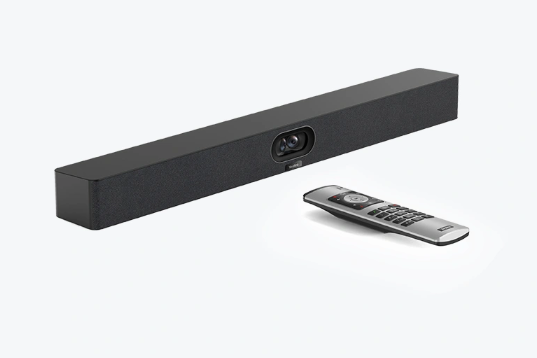
What's the difference between add to cart, backorder & request a quote?
Add to Cart lets you purchase in-stock products immediately.
Backorder is available for items that are out of stock. Placing a backorder secures your order; contact us to confirm ETA before ordering if you need it urgently.
Request a Quote is for customised pricing, volume-based deals, or orders that need a tailored response.
specs-tabs
Collapsible content
Technical Specifications
FAQs
Datasheet
Technical Specifications
FAQs
Datasheet
This product has a detailed PDF datasheet available. Open PDF datasheet in a new tab .
Related Products
-
 Vendor:Logitech
Logitech 993-001889 | MeetUp Wall Mount for ConferenceCam, Black
993-001889
In stock
Vendor:LogitechThe Logitech MeetUp Wall Mount in black is a purpose-built wall mounting bracket for the Logitech Me... -
 Vendor:Logitech
Logitech 960-001101 | MeetUp 4K Conference Camera, 120° FOV, No Expansion Mic
960-001101
In stock
Vendor:LogitechThe Logitech MeetUp 4K video conferencing camera is an all-in-one USB conference camera and speakerp... -

 Vendor:PolyThe Poly Studio V12 is a plug-and-play 4K USB video bar for small meeting rooms and BYOD spaces. It ...
-
 Vendor:Yealink
Yealink A40-031 | MeetingBar A40 Video Conferencing Bar, Dual 48MP, 4K, CTP25 Touch Console
A40-031
In stock
Vendor:YealinkThe Yealink MeetingBar A40 A40-031 is an all-in-one Android 13 video conferencing bar for small to m... -
 Vendor:Yealink
Yealink A20-010 | MeetingBar A20 Video Bar, 4K Camera, 8 Microphone Array, AU Plug
A20-010
Stock Status: Enquire
Vendor:YealinkIntroducing the Yealink A20-010 MeetingBar, a cutting-edge video conferencing system designed to tra... -
 Vendor:Yealink
Yealink VCS-TVClip | TV Clip Mount Kit for UVC40, MeetingEye, MeetingBar
VCS-TVClip
Stock Status: Enquire
Vendor:YealinkThe Yealink VCS-TVClip is a TV clip mount kit that lets a compatible Yealink video bar sit securely ... -
 Vendor:Logitech
Logitech TAPRMWUNIAPP | Rally Bar Mini 4K Video Bar, Tap Appliance, White, Cat5e
TAPRMWUNIAPP
In stock
Vendor:LogitechThe Logitech Rally Bar Mini is an all-in-one 4K video bar for small to medium meeting rooms, supplie... -
 Vendor:Logitech
Logitech TAPRMWMSTLNV3 | Tap MTR Windows Small Room Kit, Rally Bar Mini, Lenovo
TAPRMWMSTLNV3
Stock Status: Enquire
Vendor:LogitechThe Logitech Tap for Microsoft Teams Rooms on Windows Small Room kit is a video conferencing system ...


Recently Viewed
-

Request for a Quote
Looking for competitive pricing? Submit a request, and our team will provide a tailored quote that fits your needs.

