

Yealink A24-PS | DeskVision A24 Teams 23.8in Touch Display, 4K Camera
Yealink A24-PS | DeskVision A24 Teams 23.8in Touch Display, 4K Camera
Authorised Yealink Partner
SKU:A24-PS
Stock Status: Enquire
Description
Description
The Yealink A24-PS DeskVision A24 Teams Edition is an all-in-one 23.8-inch touchscreen collaboration display with a built-in 4K camera, dual microphones and stereo speakers. It runs as a native Microsoft Teams display with a dedicated Teams button, making it well suited to hot desking and executive desks, and doubles as a PC monitor and USB-C docking station.
A single USB-C cable delivers PD power, USB network, USB hub and extended screen to a connected laptop. The motorised lift camera provides privacy protection, and one-key switching moves between UC Workstation mode and Teams Display mode. A Qi wireless charging pad is built into the base.
Features
Features
Warranty
Warranty
All technical data should be verified on the manufacturer data sheets.
View full details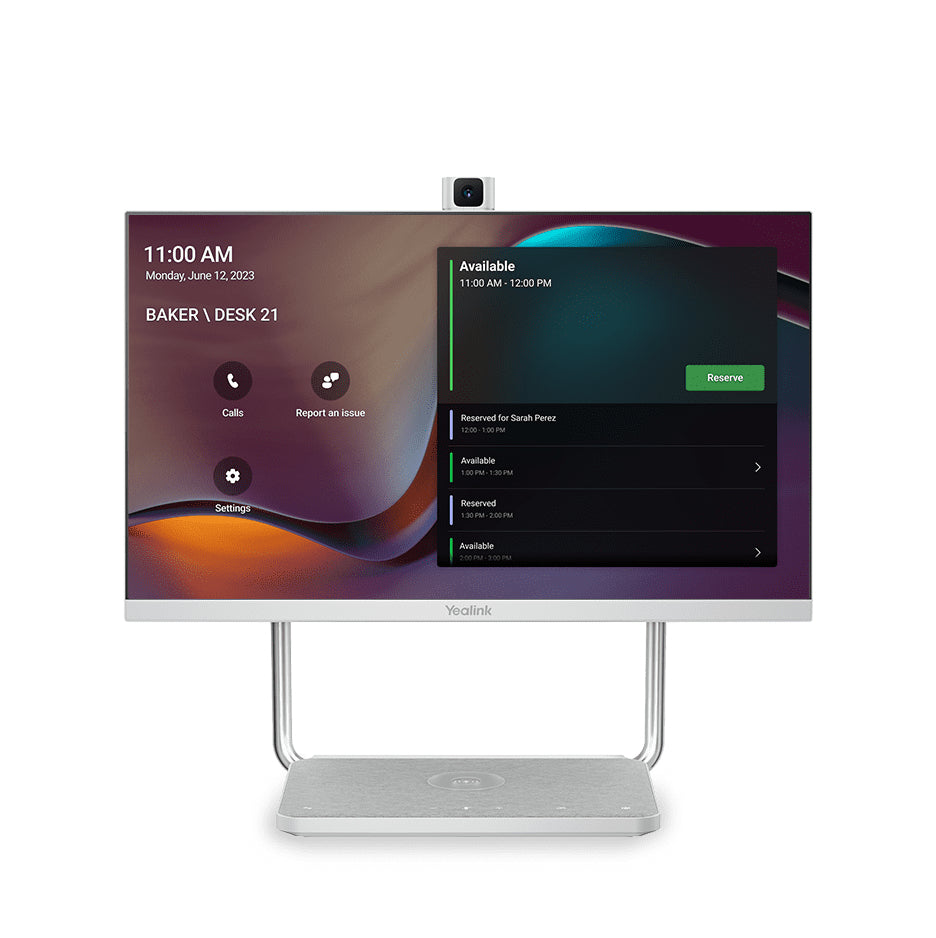
What's the difference between add to cart, backorder & request a quote?
Add to Cart lets you purchase in-stock products immediately.
Backorder is available for items that are out of stock. Placing a backorder secures your order; contact us to confirm ETA before ordering if you need it urgently.
Request a Quote is for customised pricing, volume-based deals, or orders that need a tailored response.
specs-tabs
Collapsible content
Technical Specifications
FAQs
Technical Specifications
FAQs
Related Products
-
 Vendor:Yealink
Yealink VB-TVMOUNT-01 | TV Mount Kit for MeetingBar A40, A50, SmartVision 40
VB-TVMOUNT-01
In stock
Vendor:YealinkThe Yealink VB-TVMOUNT-01 is a TV mount kit for Yealink video conferencing bars, designed for the Me... -
 Vendor:Logitech
Logitech 993-001137 | GROUP Mini-DIN Video Conferencing Spare Cable
993-001137
Stock Status: Enquire
Vendor:LogitechThe Logitech GROUP Mini-DIN cable is a genuine spare video cable for the Logitech GROUP video confer... -
 Vendor:Logitech
Logitech 993-001145 | Power Adapter for PTZ Pro 2, GROUP, Connect, MeetUp, AU Plug
993-001145
In stock
Vendor:LogitechThis Logitech spare power adapter is a replacement power supply for PTZ Pro 2 camera, GROUP, Confere... -
 Vendor:Poly
Poly 875L4AA | Studio USB Bluetooth Remote Control, Batteries Included
875L4AA
In stock
Vendor:PolyThe Poly Studio USB Bluetooth Remote Control is a wireless remote for Poly Studio video conferencing... -
 Vendor:Logitech
Logitech 952-000047 | Rally Mic Pod Extension Cable, 10m, White, Plenum
952-000047
Stock Status: Enquire
Vendor:LogitechThe Logitech Rally Mic Pod Extension Cable is a 10m, white, plenum-rated extension cable that adds r... -
 Vendor:Yealink
Yealink UVC40-E2 | UVC40 E2 4K USB Video Bar, AI Auto Framing, 8-Mic
UVC40-E2
In stock
Vendor:YealinkThe Yealink UVC40 E2 is an all-in-one 4K USB video bar built for huddle and small meeting rooms. It ... -
Vendor:Logitech
Logitech 993-001634 | BCC950 ConferenceCam Power Adapter, AU Plug, Black
993-001634
Stock Status: Enquire
Vendor:LogitechThis Logitech BCC950 ConferenceCam power adapter is a genuine replacement AC adapter that supplies p... -
 Vendor:Logitech
Logitech 952-000181 | Rally Mic Pod CAT Coupler, CAT6a, up to 20m
952-000181
In stock
Vendor:LogitechThe Logitech Rally Mic Pod CAT Coupler lets you extend the cable run of Rally Mic Pods and Mic Pod H...


Recently Viewed
-

Request for a Quote
Looking for competitive pricing? Submit a request, and our team will provide a tailored quote that fits your needs.

