

Yealink A24 | DeskVision A24 Teams Display, 23.8in Touch, 4K Camera, Qi
Yealink A24 | DeskVision A24 Teams Display, 23.8in Touch, 4K Camera, Qi
Authorised Yealink Partner
SKU:A24
Stock Status: Enquire
Description
Description
The Yealink DeskVision A24 is an all-in-one Microsoft Teams video collaboration display that combines a 23.8-inch multi-touch screen, a pop-up 4K camera, dual microphones and stereo speakers in a single desktop unit. This Microsoft Teams edition in Dark Grey adds a built-in Qi wireless charging pad, making it a practical personal workstation for hot-desking, executive offices and hybrid work environments.
The A24 runs Microsoft Teams Room on Android as a standalone display, and switches in one step to UC Workstation mode, where a single USB-C cable delivers up to 45W of power to a connected laptop along with display, USB hub and network connectivity. Dual-band Wi-Fi, Bluetooth, HDMI input and a full complement of USB ports let it fit into existing desk setups with a single power cord.
Features
Features
Warranty
Warranty
All technical data should be verified on the manufacturer data sheets.
View full details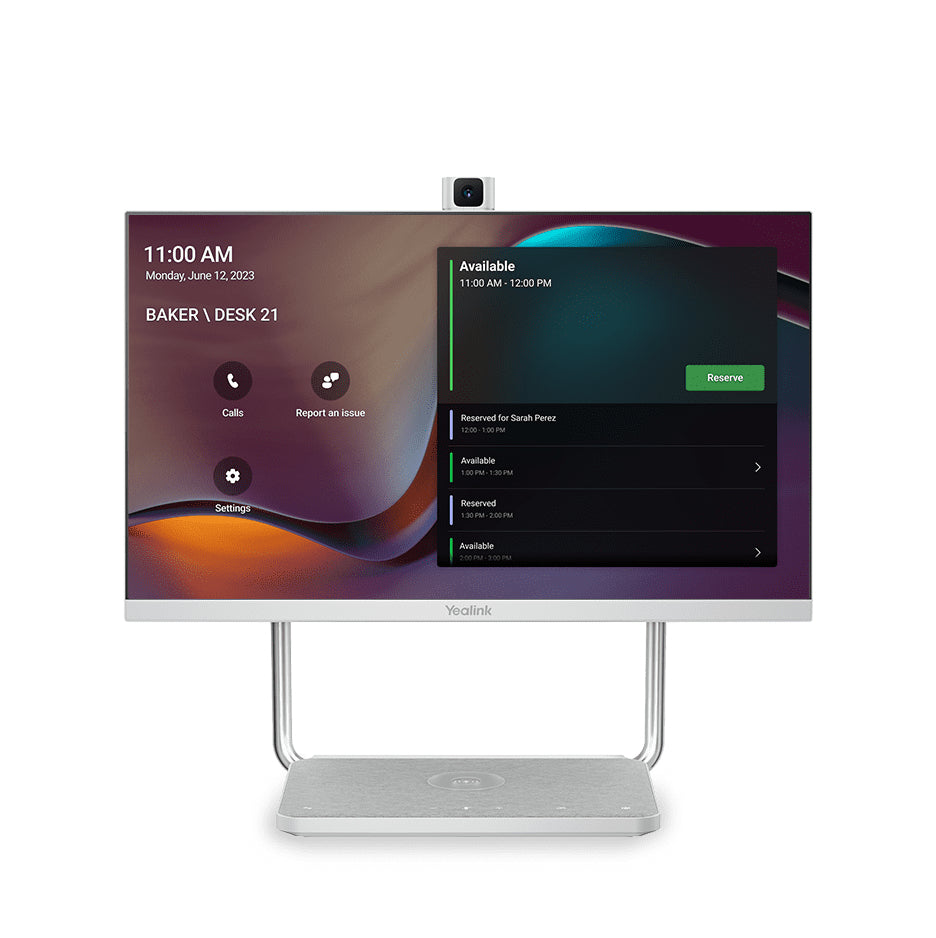
What's the difference between add to cart, backorder & request a quote?
Add to Cart lets you purchase in-stock products immediately.
Backorder is available for items that are out of stock. Placing a backorder secures your order; contact us to confirm ETA before ordering if you need it urgently.
Request a Quote is for customised pricing, volume-based deals, or orders that need a tailored response.
specs-tabs
Collapsible content
Technical Specifications
FAQs
Technical Specifications
FAQs
Related Products
-
 Vendor:Logitech
Logitech 993-001889 | MeetUp Wall Mount for ConferenceCam, Black
993-001889
In stock
Vendor:LogitechThe Logitech MeetUp Wall Mount in black is a purpose-built wall mounting bracket for the Logitech Me... -
 Vendor:Logitech
Logitech 960-001101 | MeetUp 4K Conference Camera, 120° FOV, No Expansion Mic
960-001101
In stock
Vendor:LogitechThe Logitech MeetUp 4K video conferencing camera is an all-in-one USB conference camera and speakerp... -

 Vendor:PolyThe Poly Studio V12 is a plug-and-play 4K USB video bar for small meeting rooms and BYOD spaces. It ...
-
 Vendor:Yealink
Yealink A40-031 | MeetingBar A40 Video Conferencing Bar, Dual 48MP, 4K, CTP25 Touch Console
A40-031
In stock
Vendor:YealinkThe Yealink MeetingBar A40 A40-031 is an all-in-one Android 13 video conferencing bar for small to m... -
 Vendor:Yealink
Yealink A20-010 | MeetingBar A20 Video Bar, 4K Camera, 8 Microphone Array, AU Plug
A20-010
Stock Status: Enquire
Vendor:YealinkIntroducing the Yealink A20-010 MeetingBar, a cutting-edge video conferencing system designed to tra... -
 Vendor:Yealink
Yealink VCS-TVClip | TV Clip Mount Kit for UVC40, MeetingEye, MeetingBar
VCS-TVClip
Stock Status: Enquire
Vendor:YealinkThe Yealink VCS-TVClip is a TV clip mount kit that lets a compatible Yealink video bar sit securely ... -
 Vendor:Logitech
Logitech TAPRMWUNIAPP | Rally Bar Mini 4K Video Bar, Tap Appliance, White, Cat5e
TAPRMWUNIAPP
In stock
Vendor:LogitechThe Logitech Rally Bar Mini is an all-in-one 4K video bar for small to medium meeting rooms, supplie... -
 Vendor:Logitech
Logitech TAPRMWMSTLNV3 | Tap MTR Windows Small Room Kit, Rally Bar Mini, Lenovo
TAPRMWMSTLNV3
Stock Status: Enquire
Vendor:LogitechThe Logitech Tap for Microsoft Teams Rooms on Windows Small Room kit is a video conferencing system ...


Recently Viewed
-

Request for a Quote
Looking for competitive pricing? Submit a request, and our team will provide a tailored quote that fits your needs.

