

Dell 210-AZDD | Thunderbolt Dock WD19TBS Docking Station, 180W, 130W PD
Dell 210-AZDD | Thunderbolt Dock WD19TBS Docking Station, 180W, 130W PD
Authorised Dell Partner
SKU:210-AZDD
Stock Status: Enquire
Description
Description
The Dell Thunderbolt Dock WD19TBS is a Thunderbolt 3 docking station that connects a laptop to multiple displays, Gigabit Ethernet and USB peripherals through a single Type-C cable. This SKU ships with a 180W AC adapter and delivers up to 130W power delivery to compatible Dell systems, so one cable handles power, data and video at the desk.
Video output comes from two DisplayPort++ 1.4 ports and a USB 3.2 Gen2 Type-C port with DisplayPort 1.4 or HDMI 2.0, with a rear Thunderbolt 3 Type-C port available when connected to a Thunderbolt 3 host. Gigabit Ethernet supports Wake on LAN and MAC Address Pass-Through on select Dell systems, and a front Dell PowerShare USB port charges devices. It also works with other vendors' notebooks that support Thunderbolt docking standards.
Features
Features
Warranty
Warranty
All technical data should be verified on the manufacturer data sheets.
View full details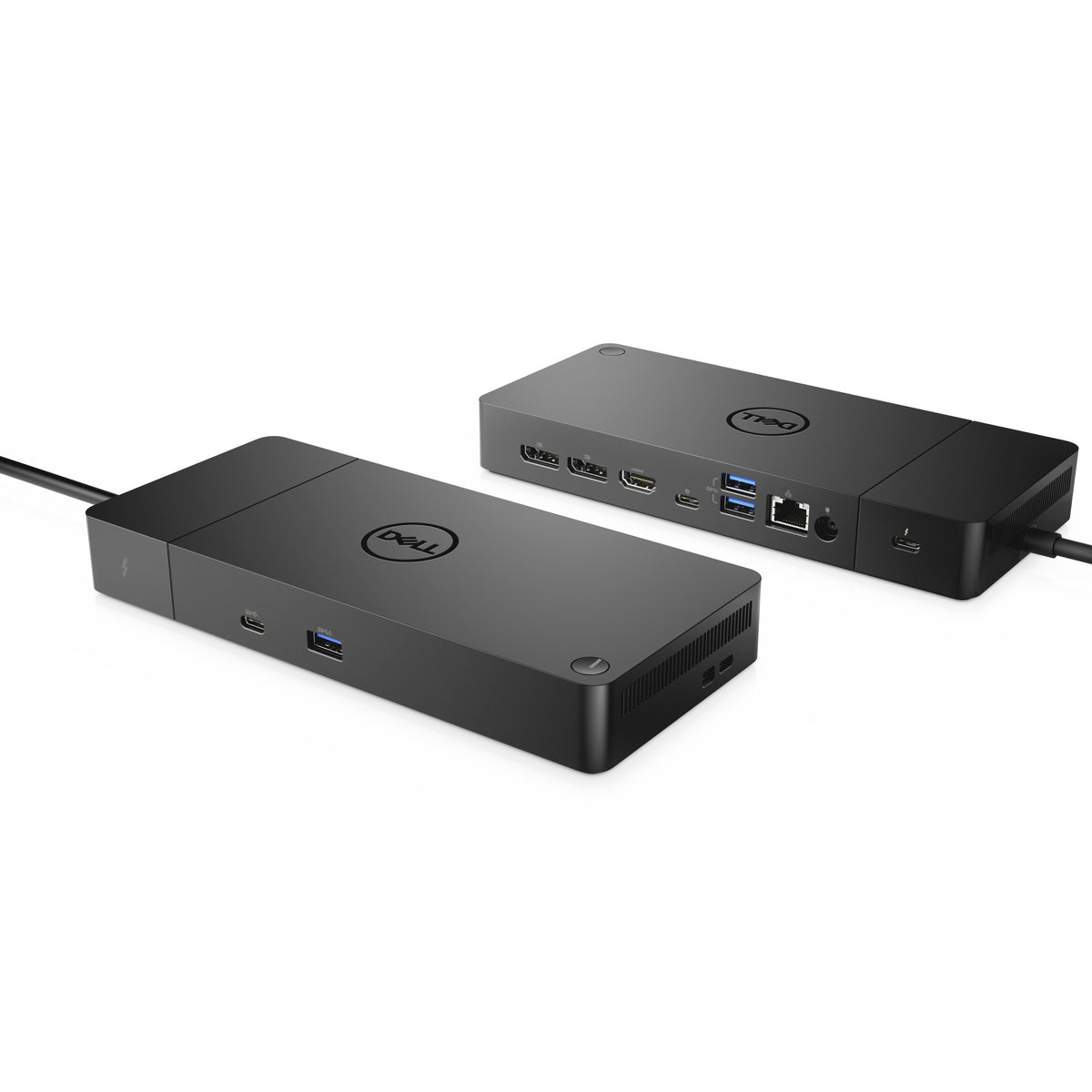
What's the difference between add to cart, backorder & request a quote?
Add to Cart lets you purchase in-stock products immediately.
Backorder is available for items that are out of stock. Placing a backorder secures your order; contact us to confirm ETA before ordering if you need it urgently.
Request a Quote is for customised pricing, volume-based deals, or orders that need a tailored response.
specs-tabs
Collapsible content
Technical Specifications
FAQs
Technical Specifications
FAQs
Related Products
-
 Vendor:Honeywell
Honeywell RP4-QD-0 | RP4 4-Bay Mobile Printer Charging Dock, AC Indoor
RP4-QD-0
Stock Status: Enquire
Vendor:HoneywellThe Honeywell RP4-QD-0 is a 4-bay AC indoor charging dock that charges up to four Honeywell RP4 seri... -
 Vendor:Honeywell
Honeywell CT60-CB-UVN-0 | CT60 4-Bay Charging Dock, No Power Cord
CT60-CB-UVN-0
Stock Status: Enquire
Vendor:HoneywellThe CT60 4-Bay ChargeBase is a desktop charging dock that charges up to four Honeywell CT60 or CT60 ... -
 Vendor:Honeywell
Honeywell CT32-CB-UVB-0 | CT32 Booted Quad Bay Charging Base, Incl Power Supply
CT32-CB-UVB-0
In stock (Supplier)
Vendor:HoneywellThe CT32-CB-UVB-0 is a CT32 booted quad bay charging base that charges up to four Honeywell CT32 mob... -
 Vendor:HP
HP F3K89AA | ElitePad Retail Expansion Dock, 4x Serial, 6x USB, HDMI/VGA
F3K89AA
Stock Status: Enquire
Vendor:HPThe F3K89AA is a retail expansion dock for the HP ElitePad Mobile POS Solution (ElitePad 900 G1 / Mo... -
 Vendor:Honeywell
Honeywell CT45-VD-CNV | CT45 Vehicle Dock, Convertible Adapter, No Speaker
CT45-VD-CNV
Stock Status: Enquire
Vendor:HoneywellThe Honeywell CT45-VD-CNV is a CT45 Series vehicle dock for charging CT45 and CT45 XP rugged mobile ... -
 Vendor:Honeywell
Honeywell EDA52-CB-5 | ScanPal EDA52 4-Bay Charging Base, AU Power Cord
EDA52-CB-5
In stock (Supplier)
Vendor:HoneywellThe ScanPal EDA52 4-bay charging base charges up to four EDA52 or EDA52HC mobile computers at the sa... -
 Vendor:Honeywell
Honeywell CT32-HB-UVN-0 | CT32 1-Bay Home Base Charging Dock, Non-Booted, USB
CT32-HB-UVN-0
In stock (Supplier)
Vendor:HoneywellThe CT32 1-bay home base is a single-bay desktop charging dock for Honeywell CT32 mobile computers u... -
 Vendor:Honeywell
Honeywell CT30P-HB-UVN-0 | CT30 XP Non-Booted Home Base Charging Dock, USB, AU
CT30P-HB-UVN-0
Stock Status: Enquire
Vendor:HoneywellThe CT30 XP non-booted Home Base is a single-bay charging dock and USB communication base for the Ho...


Recently Viewed
-

Request for a Quote
Looking for competitive pricing? Submit a request, and our team will provide a tailored quote that fits your needs.

